
GT UX PageBuilder for PeopleSoft
Build PeopleSoft Landing Pages Without Waiting on a Developer
A page builder, a content library, and navigation, all inside PeopleSoft
The policy behind the field, the guide for a twice-a-year task, the announcement that moved the deadline, and the transaction itself can sit on one page. The people who own that content build the page. There is no new system to secure, sync, or upgrade.
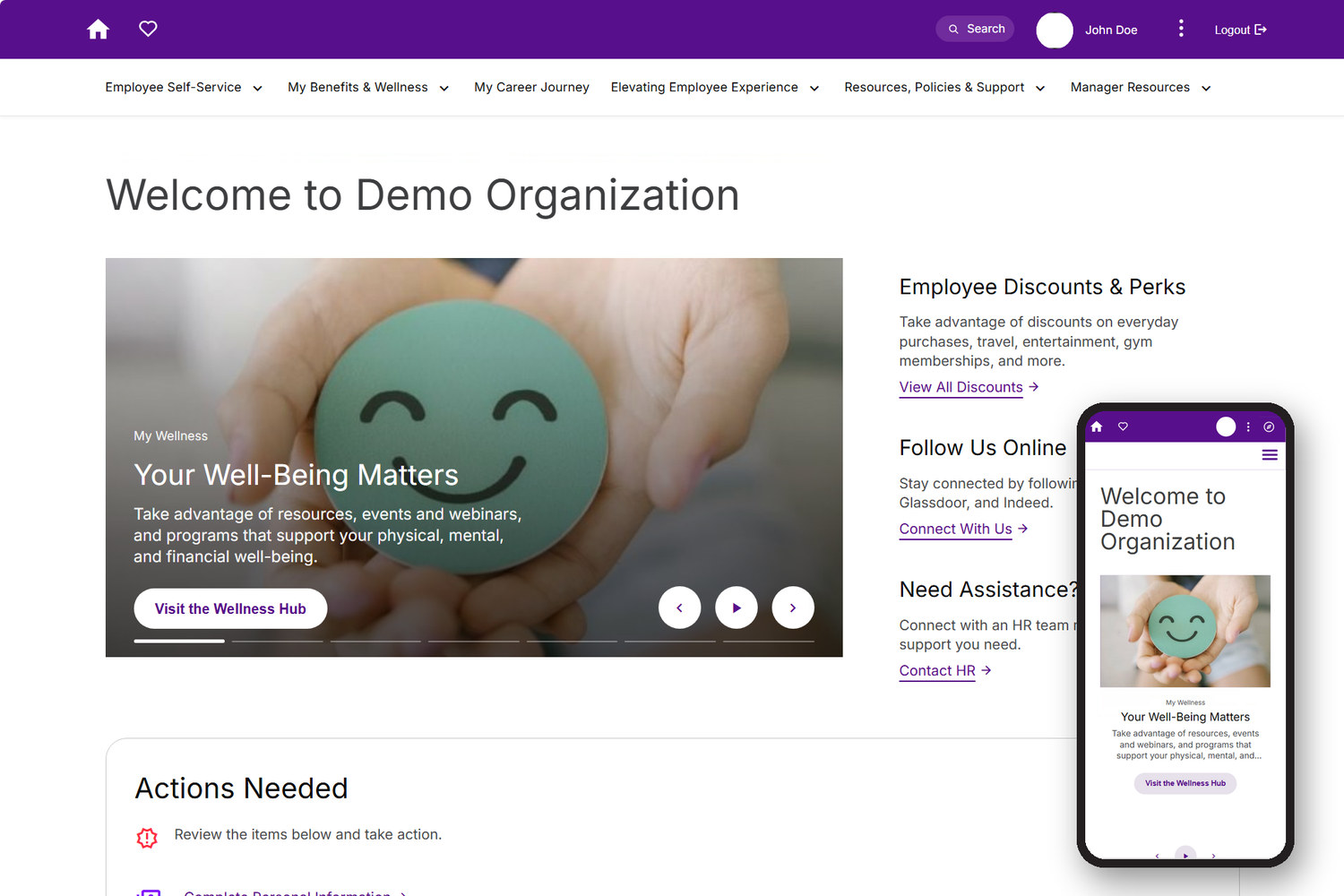
PeopleSoft Landing Pages in Production
What teams build with it: hubs, policy pages, and navigation.
These are PeopleSoft pages. No separate portal, no second login, and no employee data copied out to a content platform to make the pages work.

Handbooks, related resources, and quick-access policy links, owned by the HR team rather than by IT.

Organized around what people are trying to do, and available from Fluid, Classic, and iScript pages alike.

The benefits hub on a narrow screen, with columns stacked by the responsive grid rather than by a separate mobile build.
PeopleSoft Holds the Transaction. Where Does the Rest Live?
PeopleSoft has the data. Someone still has to build the experience.
Time
People hunt for content instead of doing the work they opened the system to do.
Trust
Content goes stale because updating it means filing a ticket, and stale content stops being read.
Overhead
Every extra system is another login, another security review, another integration to keep running.
Nothing New to Secure, Sync, or Upgrade
A content layer that runs on the PeopleSoft environment you already operate
PageBuilder is a landing page builder for PeopleSoft, used to stand up content hubs, knowledge bases, and navigation. It installs as a bolt-on module in the GT UX family. It assembles pages from widgets, content items, and navigation definitions, all held inside PeopleSoft. There is no separate server to stand up, no content to synchronize, and no second copy of your role structure to keep current.
Because pages render inside PeopleSoft, they inherit what you already have. One login. One set of permission lists. Centralized auditing of who changed what. The controls you already passed still apply, and the security updates Oracle ships still apply, because PeopleSoft stays vanilla underneath. Pages are built on Oracle JET components and a responsive grid, and our accessibility practice validates implementations against WCAG 2.1 AA.
Content owners
Publish and revise your own pages without waiting on a release window.
Security administrators
One security model, read live from the roles and permission lists you already maintain.
Platform team
No new server, no new attack surface, and no second identity to provision. It runs without a separate Interaction Hub deployment, and your upgrade and PUM path is unchanged.
How a Page Gets Built
Four steps in PageBuilder Studio, with no development ticket in between.
Studio is a visual designer inside PeopleSoft. Rows split into columns, widgets go into the columns, and layouts frame the widgets. That is the whole model, and it is closer to a modern content system than to a configuration page. Widget layouts, plus title and body CSS, keep what you build inside your brand guidelines.
01 Add a row

Full width, thirds, seventy-thirty. The twelve-column grid handles what happens on a phone.
02 Drop in a widget

An image, a video, a text block, a list of links. Images come from an upload, a URL, or a managed image already in the system.
03 Add your content

Paste straight from Word or from HTML. The editor keeps the formatting and strips the markup that usually comes with it.
04 Rearrange and save

Move a row with a click or a keystroke instead of renumbering sequences. Save, and the page is live, with nothing waiting on a release window.
The benefits page in our Lunch and Learn recording was built end to end, including content and navigation, in about twenty minutes. Advanced mode is still there underneath for the configuration Studio does not expose, and both write through the same PageBuilder APIs.
Built on What You Already Run
PageBuilder has been around for years as a configuration-driven page engine. In August 2026 we shipped PageBuilder Studio version 1.0, a visual designer that sits on top of that same engine and writes back through the same PageBuilder APIs, so the platform team sees the same security, the same rendering, and the same upgrade story. What changed is who can build a page.
Common Content
- One library for links, HTML blocks, files, images, and external URLs
- Items grouped into categories that widgets reference
- Add an item once and it appears everywhere that category is used
- Security per item, by role or permission list
Navigation
- Branded header across Fluid, Classic, and iScript pages
- Mega menu organized around what people are trying to do, rather than around the PeopleSoft menu tree
- One or two clicks to the pages people use every week
Ready for Ida
- Content is published as structured, secured PeopleSoft data rather than as pages scraped from somewhere else
- That makes it available to Ida without a separate content pipeline to build and maintain
- The same role and permission list security governs what Ida can surface to each user
Alerts and Announcements
- Target by role, by population, or by a SQL-defined audience
- Start, publish, and expiration dates on every message
- Dismissible alerts, or interactive alerts that hold the page until acknowledged
- Placement on individual pages or at the header level
Hubs, Guides, and Knowledge Bases
Patterns from live deployments and from the product walkthrough
Open Enrollment
A hero image, cards for medical, dental and vision, and retirement, a walkthrough video, a resource list of plan documents, and a link into the enrollment transaction. Valid-from and valid-to dates publish the page when the window opens and retire it when the window closes. Some customers swap in a post-enrollment page behind it.
Explaining a Multi-System Process
Paying tuition is a common example: a payment portal, an installment financing provider, and the student system, with no single page explaining which does what. One hub could lay out the process, the deadlines, the options, and the link into each transaction, ahead of the email volume that follows when it is unclear.
Departmental Content Hubs
HR policy, wellness, benefits, and payroll each get a hub owned by the team that owns it, with handbooks, accordions of policy detail, and video on the page rather than behind a link out. One customer site runs several hundred pages this way, across multiple teams.
Why Organizations Choose Gideon Taylor
Two Decades in PeopleSoft
We have spent more than two decades on PeopleSoft implementations, product development, and user experience work, and we are an Oracle PeopleSoft Innovation Partner for 2026. The people who build the product are the people in your design sessions.
A Proven Engine, a New Editor
PageBuilder is not a first release. Studio version 1.0 shipped in August 2026 as a visual layer on an established engine, and it writes back through that engine rather than around it. A multi-campus university system has been in production on PageBuilder since 2025, and a large academic medical center went live on Studio in 2026.
Extensible by Your Team
Your developers can build custom widgets that then appear in Studio for content owners to place. Accordions, tabs, cards, and video carousels are already on the way, along with a media library, per-breakpoint show and hide, and a draft and publish workflow.
See It Against Your Own Content
A working session on one page your users actually need
We will follow up to arrange a session, walk through PageBuilder Studio, and talk through what a first hub would look like in your environment.

Frequently Asked Questions
Is this a customization? What happens at upgrade?
PageBuilder is a bolt-on, so PeopleSoft stays vanilla underneath it and there are no customizations to reconcile at upgrade or PUM time. Studio writes through the same PageBuilder APIs as advanced mode, which means adopting the visual editor does not change that position or the migration path you already use. It also runs without a separate Interaction Hub deployment.
How does security work?
It uses native PeopleSoft security. Pages and individual content items are assigned to roles or permission lists, and roles and data are read in real time rather than synchronized from somewhere else. That keeps content current with the same auditing and the same controls your transactions already run under.
We already have SharePoint and a service management platform. Where does this fit?
PageBuilder is aimed at the content that belongs next to the transaction: the policy a user needs while entering data, the guide for an annual task, the announcement tied to a deadline. The practical test is whether someone has to leave PeopleSoft, and keep a second security model in step, to finish work they started in PeopleSoft.
How does content move from non-production to production?
Through a migration tool built for this content model, using standard DMS mechanics. You can select everything created since a given date for an initial cutover, or multi-select specific items for ongoing changes, then package and promote them.
Is it mobile-friendly and accessible?
Pages use a 12-column grid and Oracle JET components, so columns stack on smaller screens without a separate mobile design. The JET components are built to WCAG 2.1 AA with keyboard and screen-reader support. Authoring matters as much as rendering: Studio captures a title for every widget and alt text and captions for images, and our accessibility practice can validate a specific implementation against WCAG 2.1 AA.